
Windows VMs
A Windows machine, without the monthly plan.
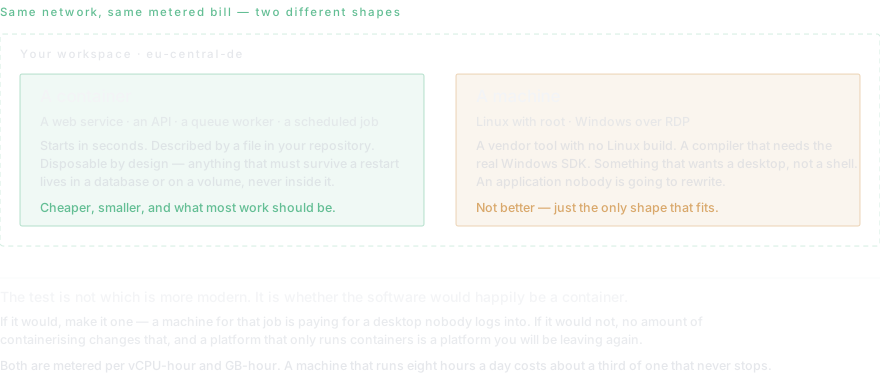
Some work needs a desktop, not a container: a vendor tool that only ships for Windows, a build that needs the real toolchain, an application nobody is going to rewrite.
Most cloud platforms give you containers and stop there. That is the right shape for a web service and the wrong shape for software that expects a desktop, a registry and an installer — and there is a lot of that software, most of it doing something important and none of it about to be rewritten.
Dockup runs Windows virtual machines over RDP on the same bill and the same private network as everything else. Metered per vCPU-hour rather than sold as a fixed monthly plan, which is the part that matters for anything not running around the clock.
- Access
- RDP, on your private network. No public address unless you open one deliberately.
- Billing
- Per vCPU-hour and GB-hour, like every other resource — not a fixed monthly plan
- Storage
- $0.10 per GB-month, persistent across restarts
- Also available
- Linux VMs with root, containers, and managed databases on the same network
- Region
- eu-central-de — the machine and its disk stay in Germany
When a Windows VM is the right answer
When the software will not run anywhere else. A vendor tool with no Linux build, a compiler that needs the real Windows SDK, an ERP client, a scanner driver, an Office automation nobody wants to touch. In every one of those cases the argument is not that Windows is better — it is that rewriting is not on the table.
It is also the right answer for a build agent that has to produce Windows binaries, and for anything that needs a graphical session rather than a shell. A container gives you a process; sometimes the job needs a desktop.
When it is the wrong answer
For a web service, an API or a worker, a container is smaller, starts faster, is described by a file in your repository and costs less. If the thing you are running would happily be a container, make it one — a VM for that job is paying for a desktop nobody logs into.
And if you only need a cheap machine you administer yourself, a commodity VPS is cheaper than any managed platform, including this one. Contabo starts around €4.50 a month. That is a different product, honestly priced, and worth saying out loud on a page about Windows machines.
What it costs
The same rates as everything else: metered per vCPU-hour and GB-hour, plus $0.10 per GB-month of storage. A machine that runs eight hours a day costs roughly a third of one that never stops, which is the whole reason for metering rather than a monthly plan.
Compared against a fixed Windows VPS the arithmetic depends entirely on utilisation. Running flat out, a commodity provider is cheaper. Running during working hours, or for a build agent that wakes for twenty minutes, metering wins clearly — and neither of those cases is served by a plan you pay for whole.
Who this is not for
A large share of demand for Windows machines and RDP access comes from people running several advertising accounts, or wanting a residential-looking desktop for automation. Dockup is not a good fit for that and does not want to be: the machines are in one German data centre, on a business account, with the usual logging.
Saying so on the page is cheaper than finding out later. If that is the requirement, the products built for it are elsewhere and easy to find.
Read next
- A Windows VM in the cloud, over RDPWindows VM in the cloud with Dockup: choose Server 2019/2022/2025 or Windows 10/11, provision CPU and RAM, retrieve RDP access, and operate securely.
- When you want a Linux box, not a containerLinux cloud boxes on Dockup: choose seven distributions, provision CPU and RAM, retrieve SSH access, configure the operating system, and compare containers.
- Persistent volumes and snapshotsPersistent volumes and snapshots on Dockup: choose mount paths, inspect usage, take and schedule snapshots, restore safely, and protect durable data.
- Private networking and .internal domainsPrivate networking on Dockup connects project services and databases through .internal names, isolates projects, and gives previews read-only database access.
Questions this page gets asked
How much does a Windows VM cost?
It is metered per vCPU-hour and GB-hour rather than sold as a monthly plan, plus $0.10 per GB-month of storage. A machine running eight hours a day costs about a third of one that runs continuously. The pricing page carries the per-unit rates so you can do the arithmetic for your own shape.
Can I connect over RDP?
Yes. The machine sits on your private network and there is no public address unless you open one deliberately — the same default as the managed databases.
Is a Windows VM cheaper than a Windows VPS?
Not if it runs around the clock. A commodity VPS provider with its own data centres will beat a metered platform on a machine that never stops. Metering wins when the machine is idle a lot: working hours only, a build agent, a test environment.
Do I need a Windows licence?
The licence is included in the metered rate. There is no separate key to buy or manage.
Can the Windows machine reach my databases?
Yes, over the same private network as everything else in the workspace, by internal hostname. It is not a separate product bolted on — it is another machine on the same network as your containers.
Is this suitable for running multiple advertising accounts?
No, and it is worth being direct about it. The machines are in one German data centre on a business account with normal logging. If the requirement is a residential-looking desktop or many isolated identities, this is the wrong product and the right ones are easy to find elsewhere.
Start on the free plan.
Ten dollars of infrastructure credit is already there, and no card is required.