
Managed PostgreSQL
PostgreSQL, without the parts you did not want to run.
Version 17, 16 or 15, provisioned in under a minute with credentials generated and injected into the services that need them.
Running Postgres yourself is easy right up to the first thing that goes wrong: a disk that fills at three in the morning, a migration that needs rolling back, a connection limit nobody set. Managed Postgres is not about the install — it is about who owns those three moments.
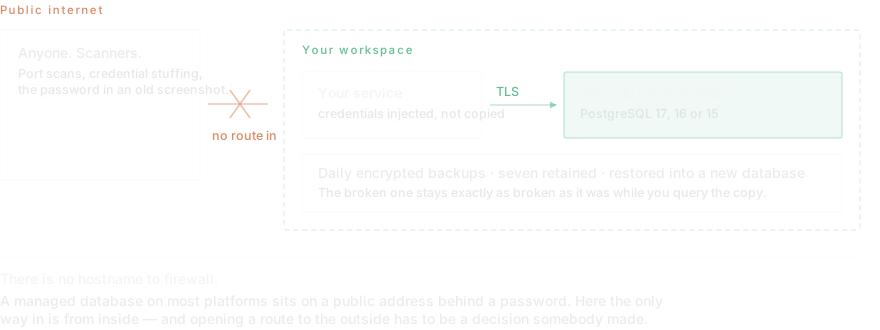
Dockup provisions the engine, generates the credentials, injects them into the services that need them, and puts the whole thing on your private network with no public hostname. Your application reaches it at a name like main-db.internal:5432, over TLS.
- Versions
- PostgreSQL 17, 16 and 15
- Connection
- main-db.internal:5432 over TLS, resolved by name inside your workspace
- Public access
- None by default. There is no hostname to firewall.
- Backups
- Daily, encrypted, seven retained, restored into a new database
- Users
- Read-only accounts scoped per person, for analytics and support
- Resizing
- CPU, memory, storage, version and region all change without a rebuild
- Cost
- $0.10 per GB-month of storage plus metered CPU and memory
How it goes
- Create the instancePick PostgreSQL 17, 16 or 15 and a size. Provisioning takes under a minute, and the version and size both change later without a rebuild.
- Let the credentials inject themselvesThe host, port, database name, user and password are generated and handed to the services that need them. Nothing is copied by hand, which is the step that usually leaks a password into a commit.
- Connect over the private nameYour application reaches it at main-db.internal:5432 over TLS. There is no public hostname, so there is nothing to firewall and nothing to find by scanning.
- Import what you already havepg_dump from the old database, psql into the new one. Anything under a few gigabytes lands in minutes.
- Verify a read before you cut overRun a real query against the restored copy. A restore that reports success and returns an empty table is the most common and most expensive surprise in this whole process.
- Add read-only users for everyone elseAnalytics, support and dashboards get their own scoped accounts rather than the application password. It costs a minute now and settles every later question about who could have written that row.
What a small Postgres actually costs
A half-core, 512 MB instance with 10 GB of storage works out at roughly $16 a month: $10.14 of compute, $5.06 of memory, $1.00 of storage. On the Pro plan the first $20 each month is included, which usually covers a database of that size entirely.
The number that surprises people on other platforms is storage. At $0.10 per GB-month, 100 GB is $10 — worth checking against whoever you are comparing, because this line varies between platforms by more than the compute does.
Restores that do not destroy the evidence
A restore here creates a new database rather than overwriting the existing one. That sounds like a detail until the day you need to compare the two, which is every day that involves a bad migration. The broken database stays exactly as broken as it was while you query the copy.
Is there free PostgreSQL hosting?
Several platforms offer one, and they divide into two kinds. The first sleeps: the database suspends after a period of inactivity and the next request pays for waking it up. That is fine for a demo and wrong for anything a user might hit. The second is time-limited, and converts to a paid plan on a date you will not remember.
Dockup grants $10 of infrastructure credit at signup and does not sleep. On the rates above that is most of a month of a small database. It is a real free tier rather than an unlimited one, and the distinction matters more than the word free does: what you want to know is what happens in month two, not month one.
What makes managed Postgres different from installing it yourself
Installing PostgreSQL takes about four minutes and is not the work. The work is everything after: the disk that fills at three in the morning, the minor version upgrade with a CVE attached to it, the connection limit nobody set until pgbouncer became a topic, the backup that has never been restored and therefore is not a backup.
A managed instance is a decision about who owns those moments. You still write the schema, still write the queries, still choose the indexes — none of that is taken away. What changes is that the disk, the upgrades, the daily encrypted backups and the private networking arrive already handled.
The honest counter-argument: if you enjoy operating databases and your workload is large, running it yourself on raw compute is cheaper. That trade is real, and it is the same trade as every managed service. It stops being worth it at the point where an hour of your attention costs more than the difference.
Why there is no public hostname
A managed database on most platforms comes with an address on the public internet and a password protecting it. That works until the password is in a repository, a log line, or a screenshot in a support ticket — and then the only thing between a stranger and your data was a string.
Here the instance is reachable only from inside your own workspace, by name, over TLS. There is no address to scan for and no port to leave open by accident. When something genuinely outside needs in — a BI tool, a partner integration — you open a route deliberately, and the fact that it took a decision is the point.
Day to day this changes one habit: browsing and querying happen in the dashboard rather than through a client pointed at a public endpoint. For a running application, which resolves the private name, nothing changes at all.
Moving an existing database here
The move is pg_dump on one side and psql on the other, and for a database under a few gigabytes it is minutes rather than an afternoon. What takes the planning is not the data but the cutover — the window where the old database and the new one are both reachable, and writes must land in exactly one of them.
The standard way through is to make the old side read-only for the length of the window, then change the connection string and let traffic drain. Lower the DNS TTL a day ahead if a hostname is involved. Recreate credentials rather than copying them: the new instance issues its own, and carrying the old ones across defeats the injection that makes them safe.
Other guides in this section
- Managed MySQLManaged MySQL 8.4 or 8.0 with credentials injected, TLS by default and no public hostname. Daily encrypted backups.
- Managed MongoDBManaged MongoDB 8 or 7 with credentials injected, TLS by default and no public hostname — the default that prevents exposure.
- Managed RedisManaged Redis 7 with credentials injected and TLS by default, for caching and job queues. Daily encrypted backups included.
Read next
- The managed PostgreSQL guideManaged PostgreSQL on Dockup: create a database, connect a service securely, inspect size and logs, back up data, restore safely, and add read-only users.
- Backups you have actually restoredUntested database backups fail in predictable ways: empty dumps, missing roles, wrong flags, no encryption key. Learn how to verify a restore so the file you are keeping is one that works.
- Point-in-time recovery vs. snapshotsPoint-in-time recovery vs snapshots comes down to one number: how much data you can afford to lose. Understand RPO, when nightly snapshots are enough, and when they quietly are not.
- Scaling a database that is already liveFrom vertical scaling to sharding: learn the strategies that will keep your database performant as you grow.
Questions this page gets asked
Which PostgreSQL versions are available?
PostgreSQL 17, 16 and 15. The version is chosen at creation and can be changed later without rebuilding the instance.
Can I connect from my laptop?
Not by default — there is no public hostname. You can open an external route deliberately when an outside client genuinely needs one, or browse and query from the dashboard without opening anything.
How do I import an existing database?
With pg_dump and psql, the same as anywhere else. A database under a few gigabytes imports in minutes.
What does managed PostgreSQL cost?
Storage at $0.10 per GB-month plus metered compute and memory. A half-core, 512 MB instance with 10 GB of storage is roughly $16 a month — inside the $20 included on Pro.
Is there a free PostgreSQL hosting tier?
Dockup grants $10 of infrastructure credit at signup and the free plan does not sleep, which on these rates covers most of a month of a small database. The question worth asking of any free tier is what happens in month two — many either suspend the instance after inactivity or expire on a date.
How much does managed PostgreSQL cost per month?
Storage is $0.10 per GB-month plus metered CPU and memory. A half-core, 512 MB instance with 10 GB of storage is about $16 a month, which sits inside the $20 of usage included on the Pro plan. Storage is the line that varies most between platforms — worth checking against whoever you are comparing.
Can I resize the database later?
Yes. CPU, memory, storage, PostgreSQL version and region all change without rebuilding the instance or dumping and reloading the data.
What happens to my data if I stop paying?
The instance suspends rather than being deleted, and the daily encrypted backups are retained for seven days. Export with pg_dump before you leave anyway — a backup you hold is worth more than one you have to ask for.
Start on the free plan.
Ten dollars of infrastructure credit is already there, and no card is required.