
Docker hosting
From repository to production.
Connect GitHub once. Every approved change becomes a repeatable deployment — built in isolation, verified before it takes traffic, and reversible from the same screen.
Container hosting splits into two kinds. One gives you a machine and leaves the rest to you: the daemon, the registry, the reverse proxy, the certificate renewal, the restart policy that nobody tested. The other takes a repository and gives back a URL.
Dockup is the second kind, without hiding the first. If your repository has a Dockerfile it is used. If it does not, Nixpacks works out what the project is and builds it anyway. Either way the image is assembled away from whatever is currently serving traffic.
- Build input
- A Dockerfile if you have one, Nixpacks if you do not
- Trigger
- Deploy on every push, or hold each release for manual approval
- Typical build
- Around 18 seconds with dependencies cached
- The gate
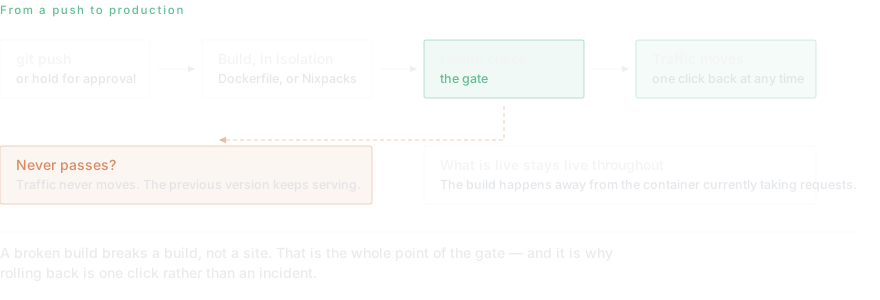
- Nothing moves until the new version answers. If it never does, your users never see it.
- Rollback
- The previous version is held, so going back is a switch rather than a rebuild
- Included
- Runtime and build logs, CPU/memory/disk, custom domains with TLS, environment variables
Why the health gate is the whole feature
A deployment that succeeds and a service that works are different events, and most outages live in the gap. A build can pass every step and still produce a container that exits on startup because an environment variable never arrived.
Dockup does not switch traffic until the new version answers. The old one keeps serving while the new one is asked to prove itself, and if it never does, the release stops there — visible in the logs, invisible to your users.
What runs alongside it
A container on its own is rarely the whole application. Managed databases sit on the same private network and resolve by name; persistent volumes survive restarts; custom domains get certificates that renew without anyone uploading anything.
What does Docker hosting actually cost?
A small always-on container -- half a core, 512 MB -- is roughly $15 a month of metered compute and memory. A 1 vCPU, 2 GB service is closer to $40. Storage is $0.10 per GB-month and egress is $0.09 per GB, both billed only for what you use.
The comparison people usually want is against a plain VPS, and it is not flattering in one direction or the other. A 2 GB VPS from a commodity provider costs less. What it does not include is the build pipeline, the health gate, the certificate renewal, the daily database backups and the person who deals with the disk filling up. The gap between the two numbers is what that work costs, and whether it is worth paying depends entirely on what an hour of your time is worth.
Do I need a Dockerfile?
No, and this is where a lot of container hosting stops being useful. If your repository has a Dockerfile it is used exactly as written -- no rewriting, no injected base image, no surprises between what you tested locally and what runs.
If it does not, Nixpacks inspects the project, works out that it is Node or Python or Go or Ruby, and builds a sensible image without being asked. That covers most applications that have never needed a Dockerfile and were not going to write their first one in order to deploy.
The build happens away from whatever is currently serving traffic, so a broken build breaks a build rather than a site. What is live stays live until something healthy is ready to replace it.
Containers, virtual machines, or your own server
A container is the right shape for most things: a web service, an API, a worker, a scheduled job. It starts fast, it is described by a file in your repository, and it is disposable by design -- which is exactly why anything that must survive a restart belongs in a database or on a volume rather than on the container filesystem.
Some workloads are not that shape. Something that needs root on a real Linux box, or a Windows desktop over RDP, is a virtual machine and no amount of containerising makes it otherwise. Dockup runs both, on the same bill and the same private network, which is unusual in this category.
And some servers are not going anywhere -- a machine in an office, a box a client insists on. Those stay yours and still get deployed to over SSH, with the output, the timings and the exit codes kept alongside every other deployment.
Read next
- From a Git repository to productionGit repository to production with Dockup: create a service, choose Nixpacks or Dockerfile, configure health checks, deploy, verify, and roll back.
- Nixpacks or a Dockerfile — which and whenNixpacks vs Dockerfile for PaaS builds: compare detection, reproducibility, customization, debugging, security, and the right Dockup deployment path.
- How zero-downtime deployments actually workLearn how to deploy your applications without any service interruption using rolling updates and blue-green deployment strategies.
- When the health check fails the deploymentA health check failing on deployment while the app runs fine locally usually comes down to five causes. Work through binding, path, port, timing and dependencies in the order that finds it fastest.
- The build succeeded but the site is downYour dashboard says running and your users see an error. Learn why deploy success and application health are different signals, and how to make a green deploy mean the app actually answers.
- A deployment stuck in queuedA deployment stuck in queued is usually waiting on something outside your build. Learn what queueing means, how to tell a wait from a hang, and how to get a stuck release moving.
- A build that fails with no logsA build failed with no logs means the failure happened before your build did. Learn the four stages where that occurs, how to tell them apart, and how to get output from each one.
- Reading build and runtime logsBuild and runtime logs on Dockup: use --build and --follow, separate failure stages, read NDJSON, preserve exit codes, and diagnose deploys faster.
- Environment variables and secretsEnvironment variables and secrets on Dockup: set, import, mask, rotate, and redeploy configuration safely for services and autonomous agents.
- Environment variables that never reach the containerEnvironment variables not working in a container usually fail for one of five reasons: build time versus runtime, frontend bundling, quoting, restart timing, or the wrong scope. Check them in order.
- dockup.yaml — configuration as codedockup.yaml config as code with a read-only plan, additive apply, explicit prune, health checks, domains, resources, and safe secret handling.
- Custom domains and automatic TLSCustom domain and automatic TLS on Dockup: add DNS, verify ownership, issue HTTPS, expose extra ports, validate cutover, and troubleshoot safely.
- A certificate stuck on validatingA custom domain stuck validating usually fails on one of four things: the record type, a proxy in front of the challenge, propagation you cannot see, or CAA. Check them in this order.
- Private networking and internal domainsPrivate networking on Dockup connects project services and databases through .internal names, isolates projects, and gives previews read-only database access.
Questions this page gets asked
Do I need a Dockerfile?
No. If the repository has one it is used; if not, Nixpacks detects the project type and builds it. Both paths produce the same kind of deployment.
What happens if a deploy breaks the app?
It does not reach your users. Traffic only switches once the new version responds, and the previous version is held so rolling back is a switch rather than a rebuild.
Can I deploy on every push?
Yes, or you can hold each release for manual approval. Dockup watches the branch you nominate and Git stays the source of truth — there is no separate state to keep in sync.
How long does a build take?
Around eighteen seconds for a typical service with dependencies cached. Build minutes are metered at $0.007 per minute and only while an image is actually building.
What is Docker hosting?
Running an application as a container on infrastructure somebody else operates. You supply a repository, the platform builds an image from it and runs that image, handling the machine, the restarts, the routing and the TLS certificate. What you keep is the application; what you hand over is the operating.
How much does it cost to host a Docker container?
About $15 a month for a small always-on service at half a core and 512 MB, or roughly $40 for 1 vCPU and 2 GB. Compute and memory are metered, so a service that idles most of the day costs less than one running flat out. Storage is $0.10 per GB-month, egress $0.09 per GB.
Is there free Docker hosting?
The free plan grants $10 of infrastructure credit at signup, needs no card and does not sleep. That covers a small container for most of a month. Free tiers that suspend after inactivity are common in this category and are the thing to check for -- a container that sleeps is fine for a demo and wrong for anything a user reaches.
Can I run Docker Compose?
Not as a Compose file directly, but the shape it describes translates: each service becomes its own deployment and they reach each other by private hostname over an internal network. Databases from a Compose file usually become managed instances instead, which is the part most people were glad to stop running.
Where does persistent data go?
On a persistent volume or in a managed database, never on the container filesystem. A deployment replaces the container, and anything written inside it goes with the old one. This is the single most common way a self-hosted container loses data.
Start on the free plan.
Ten dollars of infrastructure credit is already there, and no card is required.