
Incident guide
Railway is down. Here is how to be sure, and what to do next.
First establish whether the platform is down or your deployment broke, because the two look identical from a failing URL and take opposite actions.
Railway publishes its own incident history at status.railway.com, and that is the first place to look — it is the only source that speaks for the platform itself. If it reports an active incident, nothing you change in your project will help, and changing things during an outage makes the recovery harder to reason about afterwards.
If the status page is green, the fault is more likely to be in your own deployment, and the rest of this guide will not help until you have ruled that out. Check the deploy logs for the most recent release first: a build that succeeded and a service that will not start is a different problem from a platform that is unreachable.
- Official source
- status.railway.com — the platform’s own incident history and current state
- Independent check
- Downdetector and IsDown aggregate user reports, which often move before a status page does
- Where engineers talk first
- r/webdev and Hacker News, usually within minutes of a large incident
- Tells it is you, not them
- A green status page, a recent deploy, a failing health check, or one service down while the rest run
- Tells it is them, not you
- Every service unreachable at once, the dashboard itself failing, or builds queueing with no worker
How it goes
- Read the status page before touching anythingstatus.railway.com first. During a confirmed incident, every change you make is a change you will have to un-reason later, and rolling back a healthy deploy because the platform is unreachable only adds a second problem.
- Rule out your own last releaseIf the status page is green, compare the failing service against your most recent deploy. A build that succeeded and a container that exits immediately is your bug, not an outage.
- Get something in front of usersA static holding page on a second platform, pointed at by DNS with a short TTL, costs nothing and stops the support load while you work.
- Take a database dump now, not laterWhile the platform is reachable, run pg_dump or mysqldump and keep the file locally. This is the one asset that does not live in your Git repository, and it is the one thing an outage can put out of reach.
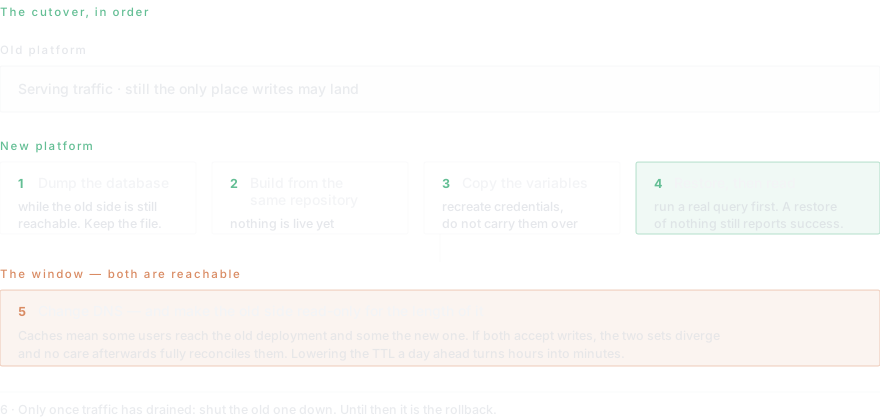
- Stand the application up somewhere elseThe repository, the Dockerfile and the build command all come across unchanged. Point a new service at the same repository and let it build while the old one is still live.
- Copy the environment variables acrossThese are the part nobody has written down. Export the full list, including the ones injected by the platform, and recreate database credentials rather than copying them — the new database will issue its own.
- Import the data, then verify a readRestore the dump into the new database and run a real query against it before sending any traffic. A restore that reports success and returns an empty table is a common and expensive surprise.
- Cut over with a short TTL, and keep the old one runningLower the DNS TTL a day ahead if you can. Point the record at the new platform, leave the old deployment running until traffic has drained, and only then shut it down.
How do I know if Railway is down or if it is just me?
The distinction is worth thirty seconds because it decides everything you do next. A platform outage takes every service down at once, usually including the dashboard you would use to investigate, and builds stop being picked up rather than failing. Your own breakage is narrower: one service, one recent deploy, a health check that never passes, a container that exits on start.
The fastest reliable test is to open the platform dashboard itself. If that will not load, the problem is not in your project. If it loads and shows one unhealthy service against several healthy ones, the problem almost certainly is.
Should I migrate during an outage?
Usually no, and this is the honest answer even though this page exists to talk about migrating. Cutting over under pressure, without a tested database restore, is how an incident that would have lasted two hours turns into data that is quietly wrong for a week.
The exception is the holding page. Putting a static page on a second platform and pointing DNS at it is reversible, takes minutes, and removes the support load. Do that during the incident. Do the real migration afterwards, deliberately, with a restore you have verified.
What actually has to move?
Less than people expect. The application is already in a Git repository, so it does not move at all — a new platform builds from the same source. The Dockerfile or the detected build works unchanged. What genuinely has to be carried across is the data, the environment variables, and the DNS record.
The environment variables are the part that bites. They accumulate over months, some of them injected by the platform rather than typed by anyone, and there is rarely a written list. Export the full set before you need it, and treat database credentials as something to recreate rather than copy, because the new database issues its own.
What does the cutover actually look like?
A window, not an instant. For a stretch measured in minutes, DNS caches mean some users reach the old deployment and some reach the new one. If both can write to their own database, the two sets of writes diverge and no amount of care afterwards fully reconciles them.
The standard way through is to make the old deployment read-only for the length of the window, or to point both at the same database until traffic has drained. Lowering the DNS TTL a day in advance shortens the window from hours to minutes and is the single cheapest thing you can do to make the move boring.
What is different about running it on Dockup
On rates, mostly nothing: compute and memory are priced within a hundredth of a cent of Railway’s, which is the honest answer and easy to check on the pricing page. Railway is cheaper on egress at $0.05 against $0.09 per GB. Dockup is cheaper on persistent storage at $0.10 against $0.158 per GB-month.
The differences that matter are elsewhere. Dockup runs Linux and Windows virtual machines as well as containers, and deploys to servers you already own over SSH. Railway has a far larger template library and a bigger community, which is a real advantage when you are looking for someone who has hit your problem already.
Read next
- From a Git repository to productionGit repository to production with Dockup: create a service, choose Nixpacks or Dockerfile, configure health checks, deploy, verify, and roll back.
- Backups you have actually restoredUntested database backups fail in predictable ways: empty dumps, missing roles, wrong flags, no encryption key. Learn how to verify a restore so the file you are keeping is one that works.
- Environment variables and secretsEnvironment variables and secrets on Dockup: set, import, mask, rotate, and redeploy configuration safely for services and autonomous agents.
- Custom domains and automatic TLSCustom domain and automatic TLS on Dockup: add DNS, verify ownership, issue HTTPS, expose extra ports, validate cutover, and troubleshoot safely.
Questions this page gets asked
Is Railway down right now?
This page cannot tell you in real time. Check status.railway.com, which is the platform’s own incident history, and cross-check Downdetector — user reports there often move before a status page is updated. If the dashboard itself will not load, that is a strong sign the problem is not in your project.
Why is my Railway deployment failing when the status page is green?
Then it is almost certainly your own release. Look at the most recent deploy: a build that succeeded but a container that exits on start is an application error, and a service that never passes its health check is usually the wrong port or a missing environment variable rather than a platform fault.
How long does it take to move an app off Railway?
An afternoon for a normal web application. The code deploys from the same repository, the environment variables copy across, and a database under a few gigabytes imports in minutes. The time goes into verifying the restore and planning the cutover, not into the move itself.
Will my database come across?
Not by itself. Take a pg_dump or mysqldump while the old platform is reachable and restore it into the new database, then run a real query against it before you send any traffic. A restore that reports success and returns an empty table is the most common way this goes wrong.
Can I keep both platforms running during the move?
Yes, and you should. Let the new deployment build and pass its health checks while the old one still serves traffic, then change DNS and leave the old one running until traffic has drained. Only one of them should be writing to a database at any moment.
Does Dockup cost less than Railway?
Not across the board, and the comparison page shows the arithmetic. Compute and memory are priced within a hundredth of a cent of each other. Railway is cheaper on egress; Dockup is cheaper on persistent storage and includes machine types Railway does not run.
Start on the free plan.
Ten dollars of infrastructure credit is already there, and no card is required.