
Alternatives
Dokploy alternatives, with prices attached.
Dokploy is free. The server is not, and neither is the evening you spend on it when a certificate expires.
Dokploy is good software that does a real job: it turns a plain VPS into something that deploys from Git. People look for alternatives for one of two reasons — either Dokploy specifically is not working out, in which case another self-hosted tool is the answer, or maintaining the machine underneath has stopped being worth it, in which case no self-hosted tool is.
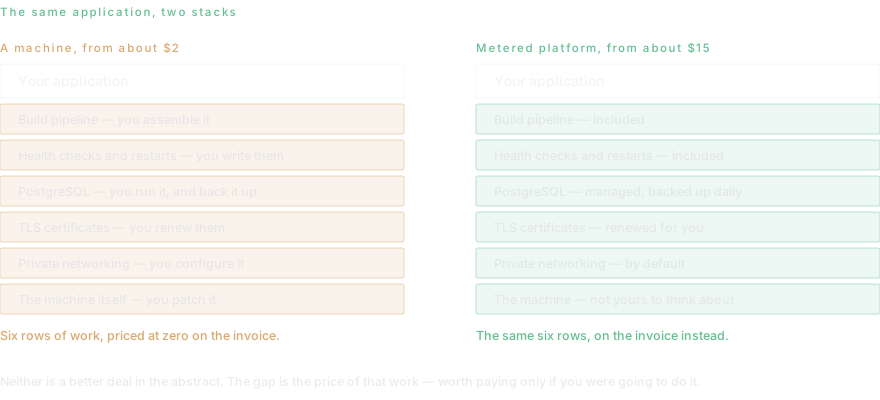
What self-hosting actually costs
The licence is free and the VPS is a few euros. Neither is the number that matters. The real cost is the disk that fills at three in the morning, the Docker version that breaks a deploy, the certificate that expires on a Sunday, and the evening spent working out which of the three it was.
That is not an argument against self-hosting — plenty of people find it a fair trade, and for a large workload the arithmetic clearly favours it. It is an argument for counting the hours before comparing the invoices, because only one side of that comparison shows up on a bill.
Keeping the server without keeping the work
The usual assumption is that leaving a self-hosted tool means abandoning the machine. It does not have to. Dockup deploys to servers you already own over SSH and keeps the output, the timings and the exit codes alongside every other deployment.
That covers the common case where the hardware exists for a reason — an office machine, a box a client insists on, a server already paid for — but nobody wants to keep maintaining the pipeline on top of it.
Questions this page gets asked
Is Dokploy or Coolify better?
Coolify has the larger community and more integrations; Dokploy is lighter and moves faster. Both do the same job and both leave you operating the server. If that part is what is bothering you, neither one is the answer.
What is the cheapest alternative to Dokploy?
Another self-hosted tool, at the same cost: free plus your VPS. Among managed platforms, Dockup’s free plan grants $10 of infrastructure credit and does not sleep, and Render’s $7 Starter instance is the cheapest always-on managed service.
Can I move off Dokploy without giving up my server?
Yes. Dockup deploys to servers you already own over SSH, so the machine stays yours while the deployment pipeline stops being yours to maintain. That is usually the half people actually wanted to hand over.
How much does a managed platform cost compared to self-hosting?
Roughly $5 to $25 a month against a few euros for the VPS. The gap is real. Whether it is worth paying depends entirely on what an hour of your time is worth and how many hours the server takes — which for most people is more than they estimated when they set it up.
Compare something else
- Dockup and Railway
- Dockup and Render
- Dockup and Vercel
- Dockup and Heroku
- Dockup and Fly.io
- Dockup and Netlify
- Heroku alternatives
- Vercel alternatives
- Railway alternatives
- Netlify alternatives
- Supabase alternatives
- Firebase alternatives
- DigitalOcean alternatives
- Coolify alternatives
- Render alternatives
- Railway and Render, compared
- How a migration actually goes
Try it against your own workload.
The free plan grants $10 of infrastructure credit at signup, needs no card, and does not sleep.